Learn AI concepts, without the jargon
You don't need a computer science degree to make smart AI decisions. Here's what these terms actually mean — in plain English.
Not sure where to start? Run a free AI opportunity scan →
AI vs Machine Learning
AI is the umbrella. Machine learning is one tool under it.
Think of Artificial Intelligence as the goal: make computers do things that normally require human thinking — understanding language, recognizing images, making decisions.
Machine Learning is one way to get there. Instead of writing rules for every possible situation (which is impossible for most real-world problems), you show the computer thousands of examples and let it figure out the patterns on its own.
Here's an analogy: imagine you're training a new employee to sort your incoming mail. You could write a 200-page manual with rules for every scenario. That's traditional programming. Or you could sit with them for a week, show them how you sort it, and let them learn from watching you. That's machine learning — the computer learns from examples rather than instructions.
When someone says "we use AI," they're often using machine learning under the hood. When someone says "we use machine learning," they're being more specific about how. Both are correct — one is just more precise.
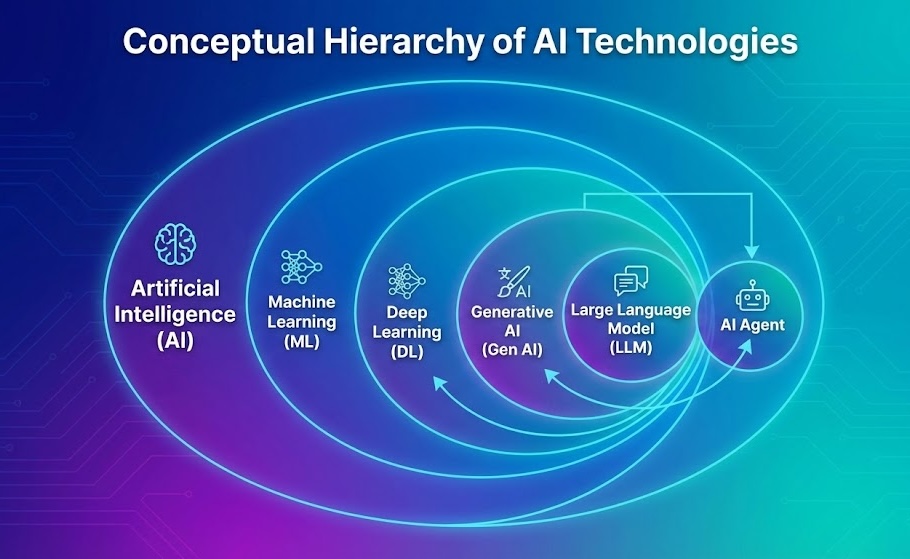 How the major AI concepts relate to each other
Deep Learning
a powerful child of Machine learning's — inspired by how the human brain works. (think of how neurons gets fired inside a human brain)
If machine learning is teaching a computer by showing it examples, deep learning is giving the computer a brain-like structure to process those examples in layers — each layer picking up on something more complex than the last.
Think of it like how you recognize a friend's face. Your eyes first pick up edges and shapes. Then your brain assembles those into features — a nose, eyes, a jawline. Then it combines those features into a face you recognize. Deep learning works the same way: the first layer finds simple patterns, the next layer combines them into more meaningful ones, and so on — layer after layer — until the system can understand something remarkably complex.
This is what makes things like voice assistants, self-driving cars, and AI-generated images possible. Regular machine learning might struggle with these tasks because the patterns are too complex. Deep learning can handle them because its layered approach lets it learn at a much deeper level — hence the name.
The trade-off is that deep learning needs a lot more data and computing power to train. For simpler problems — like predicting next month's sales — traditional machine learning often works just as well and costs much less. Deep learning shines when the problem is genuinely complex: understanding language, recognizing images, or generating new content.
Generative AI
AI that creates new things — text, images, code, music — rather than just analyzing existing data.
Most AI you've heard about before 2023 was analytical — it looked at data and told you something about it. "This email is spam." "This customer is likely to churn." "This product photo contains a defect." It classified, predicted, and sorted. Useful, but it didn't create anything new.
Generative AI flipped that. Instead of just analyzing, it creates. It writes emails, drafts reports, generates images, writes code, composes music. ChatGPT, DALL-E, Midjourney, Claude — these are all generative AI. You give them a prompt, and they produce something that didn't exist before.
Think of the difference between a food critic and a chef. The food critic (analytical AI) evaluates what's already been made. The chef (generative AI) creates something new. Both are valuable, but they do fundamentally different things.
The business impact has been enormous because generative AI can handle tasks that previously required a human's creative judgment — drafting first versions of documents, summarizing long reports, creating personalized marketing content, writing software. It's not perfect, and it needs human oversight, but it's fast. What used to take a person hours can often get to 80% done in minutes.
LLMs (Large Language Models)
The technology behind ChatGPT and its competitors — AI that understands and generates human language.
A Large Language Model is exactly what the name says: a very large AI model that's been trained on an enormous amount of text — books, websites, articles, code, conversations — to understand and generate human language.
Think of it like someone who's read every book in the world's biggest library. They haven't memorized everything word for word, but they've developed an incredibly deep intuition for how language works, what topics relate to each other, and how to communicate clearly about almost anything.
ChatGPT, Claude, Gemini, and Llama are all LLMs. When you have a conversation with one of these, it's not searching a database for your answer — it's generating a response word by word based on the patterns it learned from all that training text. That's why it can be so flexible: you can ask it to explain quantum physics, write a birthday card, summarize a legal document, and debug code — all in the same conversation.
The "large" part matters. These models have billions of parameters (think of parameters as knobs that got tuned during training). That scale is what gives them their remarkable versatility. But it also means they're expensive to build — which is why only a handful of companies train them from scratch, while everyone else builds applications on top of them.
Algorithms
A step-by-step recipe that tells a computer exactly how to solve a problem.
An algorithm is just a set of instructions — like a recipe. "Take the eggs, crack them into a bowl, whisk for 30 seconds, pour into the pan." Follow the steps in order, and you get the result every time. A computer algorithm works the same way, except instead of making breakfast, it might be sorting your customer list, calculating shipping costs, or deciding which emails are spam.
The reason this word comes up in AI conversations is that machine learning uses algorithms to learn from data. The algorithm is the method — the specific approach the computer follows to find patterns. Some algorithms are better at recognizing images, others are better at predicting numbers, and others are better at understanding text.
Think of it like cooking techniques. Grilling, braising, and sautéing are all ways to cook food, but each works better for different ingredients. AI algorithms are the same — different techniques for different types of problems. The skill is knowing which one to use and when.
You don't need to know the names of specific algorithms to make good AI decisions. What matters is that whoever builds your AI system knows which approach fits your problem — and can explain why they chose it in terms that make sense to you.
AI Models
The brain behind the AI. Different models are good at different things.
An AI model is what you get after the learning is done. You fed the computer millions of examples, it found the patterns — and now it has a "brain" that can apply what it learned to new situations it's never seen before.
Think of it like a chef who's cooked 10,000 meals. The chef is the model — all that experience is baked in, and now they can walk into any kitchen and make something good, even with ingredients they've never worked with.
ChatGPT, Claude, and Gemini are all AI models — specifically large language models trained on enormous amounts of text. But not all models are that big. Some are small, specialized models trained only on your data to do one job really well — like reading invoices or predicting which customers might leave.
The key thing to know: there's no single "best" model. The right model depends on your problem, your data, and your budget. A small custom model that's 98% accurate on your specific task often beats a giant general-purpose model that's 80% accurate.
Training Models
Building a custom AI brain from scratch, trained entirely on your problem.
If fine-tuning is onboarding a smart generalist, training a custom model is raising a specialist from the ground up. You're not starting with someone else's AI — you're building one specifically designed for your task, trained on your data, optimized for your goals.
Think of a dog trained from birth to be a guide dog versus teaching an adult pet dog to guide. Both can work, but the purpose-built one is more reliable for that specific job.
Custom models are common for things like demand forecasting ("how many units of this product will we sell next month?"), fraud detection ("does this transaction look suspicious?"), or quality control ("does this part have a defect?"). These are narrow, well-defined problems where you have lots of historical data and need very high accuracy.
Training custom models requires good data and some patience — but the result is something that's truly yours, runs on your infrastructure, and doesn't depend on any third-party AI provider. For the right use cases, they outperform general-purpose AI significantly.
Fine-Tuning
Teaching a general-purpose AI to become an expert in your specific domain.
Imagine you hired a brilliant new employee who graduated top of their class. They're smart, well-read, and capable — but they've never worked in your industry. They don't know your terminology, your processes, or what "good" looks like at your company.
Fine-tuning is the onboarding process. You take an already-capable AI model and train it further on your specific data — your documents, your examples of correct outputs, your domain language. The result is a model that still has all its general intelligence but now speaks your language and understands your standards.
For example, a general AI model might read a mortgage document and get 70% of the fields right. A fine-tuned version — one that's been shown thousands of your actual mortgage documents with correct extractions — might hit 96%. Same underlying brain, but now it knows what a "DTI ratio" is and where to find it on page 3.
Fine-tuning makes sense when you need consistently high accuracy on a specific task and general prompting isn't cutting it. It takes some upfront effort but pays off when you're running thousands of similar tasks.
AI Agents
AI that doesn't just answer questions — it actually does work.
Most AI you've used is reactive — you ask it something, it responds, and then it sits there waiting for your next question. An AI agent is different. It can plan, take actions, use tools, and follow through on multi-step tasks without you holding its hand at every step.
Imagine the difference between asking someone for directions versus hiring a driver. The directions person gives you information — you still have to do the driving. The driver takes you there. AI agents are the driver.
A practical example: you ask an AI agent "Why are sales down in the northeast this quarter?" Instead of giving you a generic answer, it goes and pulls your sales data, compares it to last year, checks if there were any shipping delays, looks at competitor pricing changes, and comes back with an actual analysis — citing specific numbers from your systems.
The important nuance: good AI agents aren't fully autonomous robots. The best ones are designed to do the heavy lifting but check in with humans when they hit something unexpected or need a judgment call. Think of them as very capable assistants, not replacements.
RAG (Retrieval-Augmented Generation)
How AI answers questions using your actual data instead of making things up.
RAG is like a search engine — but instead of matching keywords, it actually understands your question. You can ask it in natural language, with typos, grammar mistakes, vague phrasing — and it still finds the right information from your documents, databases, or knowledge base.
Here's the problem RAG solves: AI models like ChatGPT are trained on public internet data. They know a lot about the world, but they know nothing about your company's internal policies, your product specs, your HR handbook, or your client contracts. If you ask them a question about your business, they'll either say "I don't know" or — worse — confidently make something up.
RAG fixes this by giving the AI access to your information. When you ask a question, the system first searches your documents to find the relevant pieces, then hands those pieces to the AI along with your question. The AI writes its answer based on your actual data — not its imagination.
Think of it like the difference between asking someone a question from memory versus asking them to look it up in your filing cabinet first. The answer is grounded in your real information, and it can tell you exactly which document it found it in.
Document AI
AI that reads your documents so your people don't have to.
Every business has someone whose job involves opening PDFs, scans, or forms — finding specific information, typing it into another system, and moving on to the next one. Document AI does that reading and data entry automatically.
It's like hiring a very fast, very patient reader who never gets tired, never skips a field, and can process a 200-page document in seconds instead of 40 minutes. They can handle messy handwriting, crooked scans, and documents that look different every time — and still pull out the right data.
What makes modern Document AI different from old-school OCR (the technology that's been around for decades) is that it actually understands what it's reading. Old OCR just converts images to text — it has no idea what a "borrower name" or "invoice total" means. Document AI knows what it's looking for, where to find it, and how to validate that what it found makes sense.
This is one of the most immediately impactful AI applications for most businesses, because the ROI is obvious: work that took a person 40 minutes now takes 38 seconds, with fewer errors.
Workflow Automation
Replacing repetitive manual tasks with systems that run reliably on their own — with humans still in control.
Think about the tasks your team does over and over: pulling data from one system and entering it into another, sending the same follow-up emails after every meeting, generating the same weekly report by copying numbers from five different dashboards. Workflow automation connects those steps together so they happen automatically.
Imagine a row of dominoes. Right now, a person has to knock each one over individually — they copy a file here, send a notification there, update a spreadsheet somewhere else. Workflow automation lines those dominoes up so that when the first one falls, the rest follow on their own.
What makes AI-powered workflow automation different from old-school automation (like simple email rules or scheduled scripts) is that it can handle messy, real-world situations. Traditional automation breaks when something unexpected happens — a field is missing, a document has a different format, a customer writes their request in a weird way. AI-powered workflows can understand context, adapt to variations, and make reasonable decisions without crashing.
The best part: you don't have to automate everything at once. Start with one painful, repetitive process — the one your team complains about most — automate that, and build from there.
Data Foundations
Getting your data clean, organized, and connected — so AI actually has something reliable to work with.
Here's a truth that most AI vendors won't tell you: the fanciest AI in the world is useless if it's working with bad data. Garbage in, garbage out — no algorithm can fix that.
Data foundations is the work of getting your house in order before (or while) you build AI. It means connecting your scattered data sources, cleaning up inconsistencies, establishing reliable pipelines that keep everything in sync, and building a structure that lets you actually ask questions of your data.
Think of it like building a house. You can pick the most beautiful countertops and light fixtures, but if the foundation is cracked and the plumbing doesn't connect, nothing works. Data foundations is the plumbing, the electrical, and the foundation — not glamorous, but everything depends on it.
Most businesses that try AI and fail don't fail because the AI was wrong. They fail because their data was scattered across 12 systems, formatted differently in each one, with duplicates and gaps everywhere. Fixing that first — or as part of the AI project — is what separates a prototype that demos well from a system that actually runs your business.
Data Unification
Bringing all your scattered data into one place so your business can see the full picture.
Most businesses don't have a data problem — they have a data fragmentation problem. Your sales numbers live in Salesforce, your marketing data is in Google Analytics and your ad platforms, your inventory is in a different system, your customer support tickets are somewhere else, and your accounting lives in QuickBooks or Xero. Each system has a piece of the puzzle, but nobody can see the whole picture.
Data unification brings all of those pieces together into a single, connected view. It's like going from having 10 different photo albums scattered around your house to having one organized library where you can find anything in seconds.
This isn't just about convenience — it's about the questions you can suddenly answer. "Which marketing channel brings in customers who actually stick around and spend the most?" requires combining marketing data, sales data, and customer retention data. When those live in separate systems, that question is nearly impossible to answer. When they're unified, it's straightforward.
Data unification is often the first step in any serious AI initiative, because AI needs connected, comprehensive data to produce reliable insights. It's also where businesses often see their first "aha" moment — just being able to see everything in one place reveals patterns and problems that were invisible before.
MCP (Model Context Protocol)
A universal adapter that lets AI talk to your existing tools.
Remember when every phone had a different charger? Then USB came along and one cable worked for everything. MCP is the USB standard for AI.
Here's the problem it solves: your business probably uses a dozen different tools — your CRM, your accounting software, your email, your project management system, your database. If you want AI to actually do useful work, it needs to connect to these tools. Without a standard, every single connection has to be custom-built from scratch. That's expensive and fragile.
MCP creates a common language so that any AI model can connect to any tool that supports the protocol. Build the connection once, and it works across different AI systems. If you switch from one AI provider to another, your connections still work.
For business leaders, the practical impact is: MCP makes AI integrations faster to build, cheaper to maintain, and less likely to break when you change tools. It's infrastructure — you won't see it directly, but it's the reason your AI assistant can pull data from Salesforce, check your calendar, and update your spreadsheet in one go.
Tokens
The tiny building blocks that AI language models actually read. Not words — something smaller.
When you type a sentence into ChatGPT or Claude, the AI doesn't read it word by word the way you do. It breaks your text into tokens — small chunks that might be whole words, parts of words, or even single characters. The word "understanding" might become three tokens: "under," "stand," and "ing." A short email might be 200 tokens. A long report might be 10,000.
Think of it like a currency exchange. You write in English sentences, but the AI thinks in tokens. Everything gets converted before the AI can work with it, and converted back when it responds.
Why does this matter for your business? Two reasons. First, pricing: most AI services charge per token — both for what you send in and what the AI sends back. Understanding tokens helps you predict costs. A customer service bot handling 10,000 conversations a day uses a lot of tokens, and the bill reflects that.
Second, context windows. Every AI model has a limit on how many tokens it can "see" at once — its working memory. If you're asking it to analyze a 50-page contract but the model can only hold 20 pages of tokens, it literally forgets the beginning by the time it reaches the end. Newer models have larger context windows, but the tradeoff is usually higher cost and slower speed.
When evaluating AI solutions, ask about token limits and pricing. It's one of the most practical things to understand about how AI actually works under the hood.
Context Window
How much an AI can "remember" in a single conversation. Bigger window, more it can work with at once.
Every AI model has a limit on how much text it can hold in its head at one time. That limit is called the context window, and it's measured in tokens. Think of it as the AI's desk space — a bigger desk lets it spread out more documents and reference them all at once. A smaller desk means it has to put things away before it can look at something new.
Early models like GPT-3 had a context window of about 4,000 tokens — roughly 3,000 words, or about 6 pages. That's fine for short questions and answers, but completely inadequate for analyzing a long contract, understanding a full codebase, or maintaining a complex conversation over many turns.
Modern models have dramatically larger windows. Claude can handle 200,000 tokens — enough for a full novel. GPT-4 variants go up to 128,000. Google's Gemini pushes into the millions. This unlocks use cases that were simply impossible before: "read this entire employee handbook and answer questions about it," "compare these three 40-page legal agreements," or "review all of last quarter's customer support transcripts and find patterns."
The tradeoff is that larger context windows cost more (you're paying per token) and can be slower. And there's a subtlety most vendors won't mention: just because a model can technically hold 200,000 tokens doesn't mean it pays equal attention to all of them. Information in the middle of a very long context can sometimes get "lost" — the model remembers the beginning and end better than the middle. This is getting better with each generation, but it's worth knowing.
For business decisions, the key question is: how much information does the AI need to see at once to do the job well? If you're building a chatbot that answers simple FAQs, a small context window is fine. If you're analyzing long documents or maintaining complex multi-turn conversations, you need a bigger one — and should budget accordingly.
Agentic AI vs Generative AI
Generative AI creates things when you ask. Agentic AI gets things done on its own.
Generative AI is what most people think of when they hear "AI" today — you give it a prompt, and it generates text, images, code, or summaries. It's reactive: you ask, it answers. Think ChatGPT drafting an email, or Midjourney creating an image. Powerful, but it always waits for you to tell it what to do.
Agentic AI goes further. Instead of just answering questions, it takes actions. You give it a goal — "research these five competitors and put a summary in my inbox by Friday" — and it figures out the steps, executes them, checks its own work, and delivers the result. It plans, decides, and acts, often across multiple tools and systems.
The analogy: generative AI is like a brilliant intern who writes great drafts when you ask — but you still make all the decisions. Agentic AI is like hiring a manager who takes the initiative, makes judgment calls, and gets work done independently, checking in with you only when something needs your approval.
For businesses, this distinction matters because it changes what you can automate. Generative AI makes individual tasks faster — writing, summarizing, coding. Agentic AI eliminates entire workflows. A generative AI tool might help your team write test cases 50% faster. An agentic system runs the entire QA process without human involvement.
Most real-world AI deployments today are somewhere in between: generative capabilities wrapped in agent-like orchestration, with human review at critical decision points. That's usually the right balance for production systems.
Self-Evolving Agents
AI agents that get better at their job through experience — without waiting for someone to retrain them.
Most AI systems are static after deployment. They do exactly what they were trained to do — no better, no worse — until a team of engineers retrains them with new data. That works, but it's slow and expensive. The world moves on, and the AI stays the same until someone updates it.
Self-evolving agents break this pattern. They have built-in feedback loops that let them learn from every interaction. When an agent handles a task well, it reinforces that approach. When it makes a mistake, it adjusts. Over time, it gets measurably better — without anyone retraining it from scratch.
Think of it like a chess player who reviews their own games after every match. They spot their losing patterns, try new strategies, and gradually improve — without waiting for a coach to schedule a training session. The learning happens continuously, in the background, as part of normal operations.
The mechanisms vary: some agents use reinforcement learning (try things, measure results, do more of what works), some use self-critique (review their own outputs and flag problems), and some use human feedback signals from your team's approvals and corrections.
For businesses, the appeal is obvious: you deploy an AI agent that handles, say, customer inquiries — and instead of degrading over time as your product changes, it actually keeps pace on its own. The caveat is that self-evolution needs guardrails. You want the agent to improve within boundaries, not drift into unexpected behavior. That's why monitoring and human-in-the-loop checkpoints are still essential.
Agent2Agent Protocol (A2A)
A universal language that lets AI agents from different systems talk to each other and work together.
As companies deploy more AI agents — one for customer support, one for inventory, one for finance — a problem emerges: these agents can't talk to each other. They're siloed, just like the departments they serve. Your support agent knows a customer is unhappy, but it can't tell your logistics agent to expedite a shipment.
The Agent2Agent Protocol (A2A), created by Google and now supported by over 50 technology partners including Salesforce, SAP, and Deloitte, solves this. It's a standardized way for AI agents to discover each other's capabilities, exchange information, and coordinate actions — regardless of who built them or what framework they run on.
Think of it like a translator at a United Nations meeting. Each delegate speaks their own language, but the translation system lets everyone communicate and collaborate on shared goals. A2A is that translation layer for AI agents.
If you've read about MCP (Model Context Protocol) on this page, you might wonder how they relate. They're complementary: MCP connects agents to tools and data sources (like plugging a lamp into a wall socket). A2A connects agents to other agents (like getting two people on a phone call). Both are needed for sophisticated multi-agent systems.
Why does this matter now? Because the future of enterprise AI isn't one super-agent that does everything — it's a network of specialized agents that collaborate. A2A makes that network possible without building custom integrations between every pair of agents.
OpenClaw
An open-source agent runtime that lets you run your own AI assistant on your own hardware — no cloud dependency required.
Most AI agents today run in someone else's cloud. Your data goes to their servers, gets processed, and comes back. That works fine for many use cases, but some businesses — especially in regulated industries — need AI that runs entirely on their own infrastructure.
OpenClaw is an open-source agent runtime that does exactly that. It's a self-hosted system that connects chat platforms (like WhatsApp or internal messaging tools) to AI models (Claude, GPT, or open-source alternatives) and gives the agent the ability to actually execute tasks on your machine — not just generate text, but take action.
Think of it like the difference between renting an apartment and owning a house. Cloud AI services are the apartment: convenient, maintained by someone else, but you follow their rules and your stuff is on their property. OpenClaw is the house: you own it, you control it, and nobody else has access to what's inside.
What's made OpenClaw particularly interesting is the community building around it. Developers are extending it beyond text-based tasks into robotics — using the same agent framework to control physical devices. It's one of the fastest-growing open-source AI projects, with hundreds of thousands of GitHub stars.
For businesses evaluating AI infrastructure, OpenClaw represents a growing trend: the shift toward open, self-hosted agent systems that provide full control over data, costs, and customization without vendor lock-in.
Prompt Engineering
The art of asking AI the right way. How you phrase the question determines the quality of the answer.
When you ask a colleague to do something, how you ask matters. "Write me something about marketing" gets you a vague essay. "Write a 200-word LinkedIn post about our Q1 product launch, targeting CFOs, with a confident but not salesy tone" gets you something useful. AI works the same way.
Prompt engineering is the practice of crafting clear, specific instructions that get AI to produce the output you actually want. It's not programming — it's closer to writing a good brief for a freelancer. The better your brief, the better the work.
A few techniques that make a real difference: give the AI a role ("You are a financial analyst reviewing quarterly earnings"), show it examples of what good output looks like, ask it to think step by step before giving a final answer, and be explicit about format, length, and tone. Each of these can dramatically improve the result.
Here's the honest truth about prompt engineering in 2026: it's still important, but it's becoming table stakes. As AI systems get more sophisticated, the focus is shifting from "how do I word this one question" to bigger problems — like what information the AI has access to and how the whole system around it is designed. That's where context engineering and harness engineering come in.
For most business users, the key takeaway is: spend five extra minutes crafting a clear, specific prompt with examples and constraints. It's the single easiest way to get better results from any AI tool you're already using.
Context Engineering
Designing everything the AI knows before you even ask your question — not just the prompt, but the whole information environment.
If prompt engineering is about asking the right question, context engineering is about making sure the AI has the right background before you ask. It's the difference between emailing a question to a stranger versus briefing a consultant who has access to your files, your systems, and your conversation history.
Modern AI applications don't just take a prompt and return an answer. Behind the scenes, the system is assembling a package of information that gets fed to the model: your system instructions, relevant documents pulled from your knowledge base, outputs from tools the AI just called, the last 20 messages of your conversation, and structured data from your databases. Context engineering is the discipline of designing that package — deciding what goes in, in what order, and how much.
Why does this matter? Because the same AI model will give wildly different answers depending on what context it has. Ask it to write a sales email with no context, and you get generic marketing fluff. Give it your CRM data about the prospect, their recent support tickets, your last three conversations, and your company's tone guidelines — and you get something that sounds like it was written by someone who actually knows the account.
This is becoming the critical skill in enterprise AI. As more companies deploy AI agents connected to their tools via protocols like MCP, the quality of the context design — not the model choice — is what separates AI that's useful from AI that's transformative.
Harness Engineering
Building the operating system around AI — the scaffolding that lets it work reliably, autonomously, and at scale.
Here's a surprising finding from 2026: researchers showed that the same AI model achieved anywhere from 42% to 78% success on the same task — the only difference was the infrastructure built around it. The model didn't change. The harness did.
Harness engineering is the practice of building the entire operating system that surrounds an AI model. If the model is the brain, the harness is the body — it manages which tools the AI can use, how it remembers past interactions, how its outputs get validated, what happens when something goes wrong, and how the whole system improves over time.
Think of the progression like this: prompt engineering is asking a consultant a good question. Context engineering is preparing the consultant with the right background materials. Harness engineering is building the entire firm infrastructure that lets the consultant work on a six-month project autonomously — with quality checks, error recovery, access to research tools, weekly progress reviews, and a system for learning from past engagements.
This matters for businesses because as AI moves from "answer my question" to "run this process for me," the harness becomes more important than the model itself. An AI agent managing your customer onboarding needs retry logic when APIs fail, validation rules to catch bad outputs, audit trails for compliance, graceful fallbacks when it encounters something unexpected, and a feedback loop so it gets better over time. That's all harness engineering.
The companies getting the most value from AI right now aren't the ones with the best models — they're the ones with the best harnesses around them.
Vibe Coding
Telling AI what you want in plain English and letting it write the code. Exciting — but risky without guardrails.
Vibe coding is a new trend where instead of writing software the traditional way, you describe what you want in plain English — "build me a dashboard that shows sales by region" — and an AI tool writes the code for you. You review it, tweak your description, and iterate until it looks right.
It's like telling a contractor "I want a modern kitchen with an island" instead of drawing the blueprints yourself. You describe the vibe, and they build it.
For simple prototypes and internal tools, this can be incredibly fast. A weekend project that would have taken weeks of development time can sometimes be done in hours. That's genuinely powerful.
The risk — and this is important — is that speed and correctness are not the same thing. Vibe-coded software often looks great on the surface but has problems underneath: security holes, data handling issues, edge cases that crash the system, code that nobody can maintain or debug because no human actually understands how it works. For a personal side project, that's fine. For software that handles your customers' data or runs your business operations, it's a serious liability.
The best approach is somewhere in the middle: use AI coding tools to accelerate development, but have experienced engineers review, test, and own the code that goes to production.
Want to go deeper?
Our blog covers these topics and more — with real examples from projects we've shipped.
Read the blog →Still have questions?
We're happy to explain how these technologies apply to your specific situation — no sales pitch, just straight answers.
Not sure where to start? Run a free AI opportunity scan →