Using ChatGPT or Claude on Client Files? Think Again. Here's Where Your Data Goes.

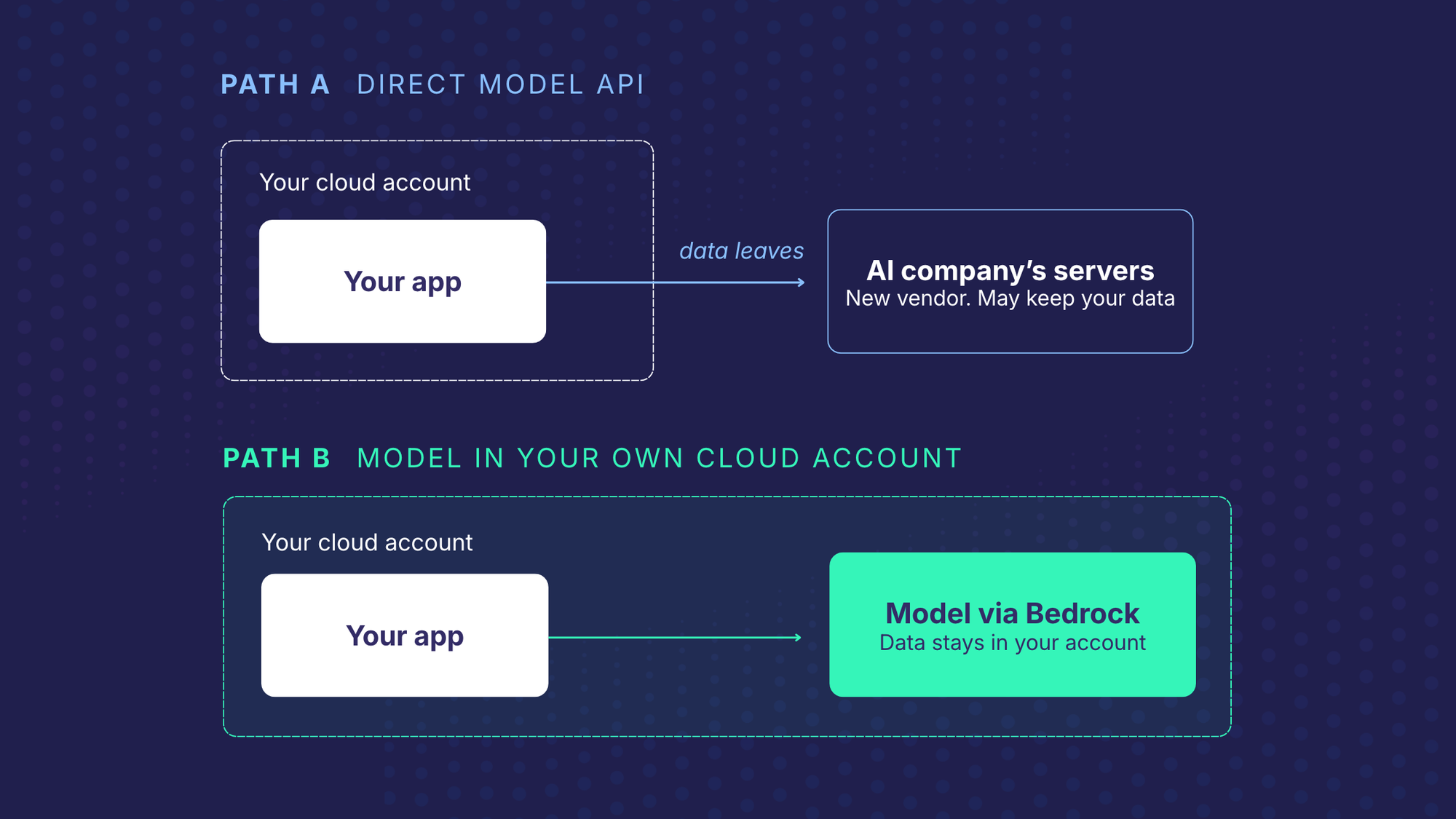
If you build software for real estate, mortgage, legal or insurance firms, choosing an AI model is the easy part. What decides whether the feature ships is where your customers' data goes when the model reads it. The same consideration applies if you work in any regulated industry, such as at a law firm, and your staff or vendors use AI on client files.
Settle that at the start and compliance review is a short conversation. Leave it until the end and a finished feature can sit for months waiting on approval, or worse, never launch at all.
This post covers why the question comes up, the four routes you can take, how one real estate platform handled it, the five questions your compliance team will ask, and the cases where none of this matters much.
Why this comes up in real estate, mortgage, legal and insurance software
The documents these platforms handle are some of the most sensitive files people have: purchase contracts, loan applications, client records, claims. They carry names, addresses, income, assets and signatures. These industries have strict rules on sharing data.
There are three things make the data question unavoidable in these industries:
- Your customers have promised their clients confidentiality. Brokerages, lenders, law firms and carriers sign agreements that limit who can see client data. Many say plainly that it can't go to a third party without approval. For law firms, this is also a professional duty. Client confidentiality and privilege do not pause for a new tool.
- You are probably audited. If your platform holds SOC 2, ISO 27001 or PCI certification, every system that touches customer data gets checked in the audit. Auditors will ask where the data went and who could see it.
- Some documents aren't yours to share. In real estate specifically, many forms are copyrighted by the board or brokerage that wrote them. Licence terms can limit access to the platform's own staff, so even your vendors may not be allowed to see them.
So when an AI feature is proposed, compliance doesn't start by asking which model is smartest. They ask where the documents will go. And that’s usually when someone in the room asks the obvious question: why not just send them to ChatGPT or Claude?
Why you can't just send client data to the ChatGPT or Claude API
Start with the consumer apps. On personal ChatGPT and Claude accounts, chats can be used for training unless the user turns it off. Most people don’t know to do that. A staff member pasting a client file into a personal chat account is a data handling problem, whatever the model.
For their business APIs, that is no longer true. Anthropic's commercial terms bar training on customer content, and OpenAI says API data hasn't been used for training since March 2023 unless the customer opts in.
But, training is not the problem. The problem is what else happens to the data:
- It leaves your environment. The document travels to the model provider's servers, outside of the cloud account your auditors have reviewed.
- It may be kept for a while. By default, OpenAI may keep API inputs and outputs for up to 30 days for abuse monitoring. Anthropic's newest models require 30-day retention, including on Bedrock and Google Cloud. Zero-retention arrangements exist, but they need the provider's approval.
- It adds a vendor. The model provider becomes a new subprocessor. It has to pass your vendor review, and often your customers' reviews too. Many customer contracts don't allow it at all.
None of these is a flaw in the providers. They are simply a new party holding regulated data, and that is the thing these industries are set up to prevent.
The four routes, compared
There are four common ways to put a model behind a feature. They trade convenience for control.
For most regulated software, hosting in your own cloud account is where things land: strong control without running your own servers. The names behind it can blur together, so here’s how they differ.
Bedrock, Azure, Vertex and self-hosting in plain terms
An AI model is a very large program that needs powerful computers in order to run. When you use the ChatGPT or Claude API, the model runs on computers owned by OpenAI or Anthropic, so your documents travel to them. Amazon, Microsoft and Google also rent out computers, and most software companies already keep their data with one of them. Their AI services put well-known models on those same computers, inside the account you already have. Your documents then reach the model without leaving the company you already trust.
- Amazon Bedrock is Amazon’s version. It lets you use models from several companies, including Anthropic's Claude, Meta's Llama, Mistral and Amazon's own. The models run on Amazon’s computers inside Amazon Web Services (AWS), not the model maker’s. This means your documents stay within Amazon, a company that you likely already use and have approved, rather than going to one more AI company. AWS states that Bedrock doesn't store or log your prompts and completions, doesn't use them for training, and doesn't pass them to third parties. For most models, the model makers can't see them either. The exception is Anthropic's newest models. On Bedrock they run only in a mode that shares data with Anthropic, kept for up to 30 days. Some models need short-term retention for safety checks, and a zero-retention mode is available. New AWS accounts do not start in that mode. You have to switch it on.
- Azure (Microsoft's Azure OpenAI service) is mainly how you run OpenAI's GPT models inside your Microsoft cloud subscription. Microsoft doesn't train on your data. However, by default it may keep prompts and outputs for up to 30 days for abuse monitoring, and turning that off takes an approval from Microsoft.
- Google Vertex AI (now called Gemini Enterprise Agent Platform) runs Google's Gemini models and some others inside Google Cloud. Google won't train on your data without permission. Gemini caches inputs for up to 24 hours by default to speed things up, and you can switch that off.
- Self-hosting means running an open model on servers you control. Nothing leaves, but you take on the hardware, security patches and model updates. It makes sense at high volume or under the strictest rules. For most teams it is more work than the problem needs.
A practical rule: start with the cloud you're already on. Your security team has reviewed it, your auditors know it, and your customers have usually approved it as a vendor already.
Example: a real estate transaction platform on Bedrock
We recently built document AI for a real estate transaction platform used by brokerages across the US and Canada. Brokerages upload purchase contracts and other standard forms. Before each form can be filled in and signed, its fields have to be found, placed precisely and matched to the platform's data dictionary. Done by hand, that took 4 to 8 hours per form.
The client holds SOC 2, PCI and ISO certifications. Its policy ruled out sending documents straight to a public model API. Even with no-training terms in place, the data would have left its environment and gone to a vendor that wasn't on its approved list.
So, we set up the model to run inside the client's own AWS account, through Amazon Bedrock. The documents never left infrastructure the client already audits, and no new vendor entered its compliance review.
That choice meant extra work beyond the AI:
- Access controls so only the client's systems and approved staff could call the models.
- An audit log from the proof of concept onward: who ran each job, when, on which model and prompt version, and what came back. The log stores a reference to each document, not the document.
- A review step. People accept or reject the AI's output, and each correction is recorded. The corrections feed a monthly update that makes the system more accurate.
- Working without the real documents. The forms are copyrighted and limited to the client's internal staff, so we had very few samples. We built and tested on publicly available forms and computer-generated ones instead.
The results:
- The internal tool cut about 80% of the manual work in form setup.
- The client then put the feature in front of its own customers. No one checks every result there. So accuracy mattered more than speed. We moved to a slower, more thorough method that costs more to run. Turnaround that could take up to 3 business days now takes about 2 minutes.
- The audit log does a second job. The client uses it to track speed and correction rates, and it gives auditors a clean record that no one outside the client's team touched the data.
The model was never the hard decision. The data handling is what got the feature approved and launched.
The five questions your compliance team will ask
Compliance review is where a lot of AI features stall. Usually the answers are fine. The trouble is that nobody wrote them down until someone asked. These are the five questions we plan for on every build in regulated software, and what a good answer looks like. If you buy software instead of building it, ask your vendor the same five questions.
If you can answer all five in the design document, before the first line of code, the security review becomes a formality instead of the thing that stalls or cancels your launch.
When calling the API directly is perfectly fine
Not every AI feature needs this much care. Calling OpenAI, Anthropic or Google directly is a reasonable choice when:
- The data is public or not sensitive. Drafting a listing description from public property details, summarizing a published regulation, or writing marketing copy.
- You're prototyping with public or synthetic data. A proof of concept on sample documents doesn't put customer data at risk.
- Your contracts allow it and the provider is approved. Some customers will accept a direct provider once it's on their vendor list, especially under zero-retention terms.
- It's your own internal content. Your help docs, your code, your product copy.
One caution: “fine” here means the data route itself is fine. The output still needs a person to check it before anyone relies on it: a lawyer confirming that a regulation summary still says what the regulation says, or an agent confirming the listing details are right. Guardrails built into the feature can shrink that work. The model can point to the source text behind each statement, automatic rules can catch obvious errors, and only uncertain results need to go to a person. That narrows the human element of the review.If you do start on a direct API, one habit keeps your options open: build so the model can be swapped. If the feature calls the model through one layer you control, moving from a direct API in the prototype to Bedrock or Azure in production is a settings change, not a rebuild.
The takeaway
Adding AI to regulated software doesn't have to create a compliance problem. It creates one when data handling is treated as a launch task instead of an early design decision.
In practice, it comes down to three steps. Decide where the data goes before you choose the model. Write down the answers to the five compliance questions. And put the audit log in the proof of concept, not the launch checklist. Do those three things, and your feature reaches customers instead of waiting in review.
Related on our site: Document AI · How we work · Success stories
Provider data terms referenced
Provider terms change often. These are the pages this post relies on, as of November 2026.